Samsung has opened its next big software test to Indian users, and this time India is in the first wave. Unfite brings you the full details of the One UI 9.5 beta India rollout, which Samsung announced on 18 November 2026 for the Galaxy S26 series. The headline addition is a native App Lock that Galaxy owners have waited years for, along with better camera controls, a journaling tool and new health features. The beta is free to join, but it is still test software, so read the warnings before you install it.
What is One UI 9.5 beta?
One UI 9.5 is Samsung’s next version of its Android skin. It is still built on Android 17, the same base as One UI 9, so this is a feature update rather than a new Android version.
Samsung launched the beta program on 18 November 2026 through its Global Newsroom, and the stable version is expected early next year, most likely arriving first on the Galaxy S27 series. That stable date is only an expectation from reports — Samsung has not announced it.
Which phones can join, and is India included?
Only three phones can join the beta for now: the Galaxy S26, Galaxy S26+ and Galaxy S26 Ultra. The Galaxy S26 FE is not included, and neither are the Galaxy Z Fold 8 or Flip 8. Samsung has not said when other Galaxy phones will get the beta.
The One UI 9.5 beta India program is open in six countries — Germany, India, South Korea, Poland, the UK and the US — and India is getting it on day one. That is good news for Indian Galaxy S26 owners, who usually wait behind Korea.
One UI 9.5 beta at a glance
| Announced | 18 November 2026 |
| Eligible phones | Galaxy S26, S26+, S26 Ultra |
| Countries | Germany, India, Korea, Poland, UK, US |
| Base | Android 17 (same as One UI 9) |
| India build (S26 Ultra, reported) | S948BXXU6ZZKN |
| Download size | About 3.5–3.7 GB, plus about 540 MB after restart (early reports) |
| Security patch in beta | 5 November 2026 |
| Price | Free |
| Stable release | Not announced; expected with Galaxy S27 series in early 2027 |
App Lock finally arrives
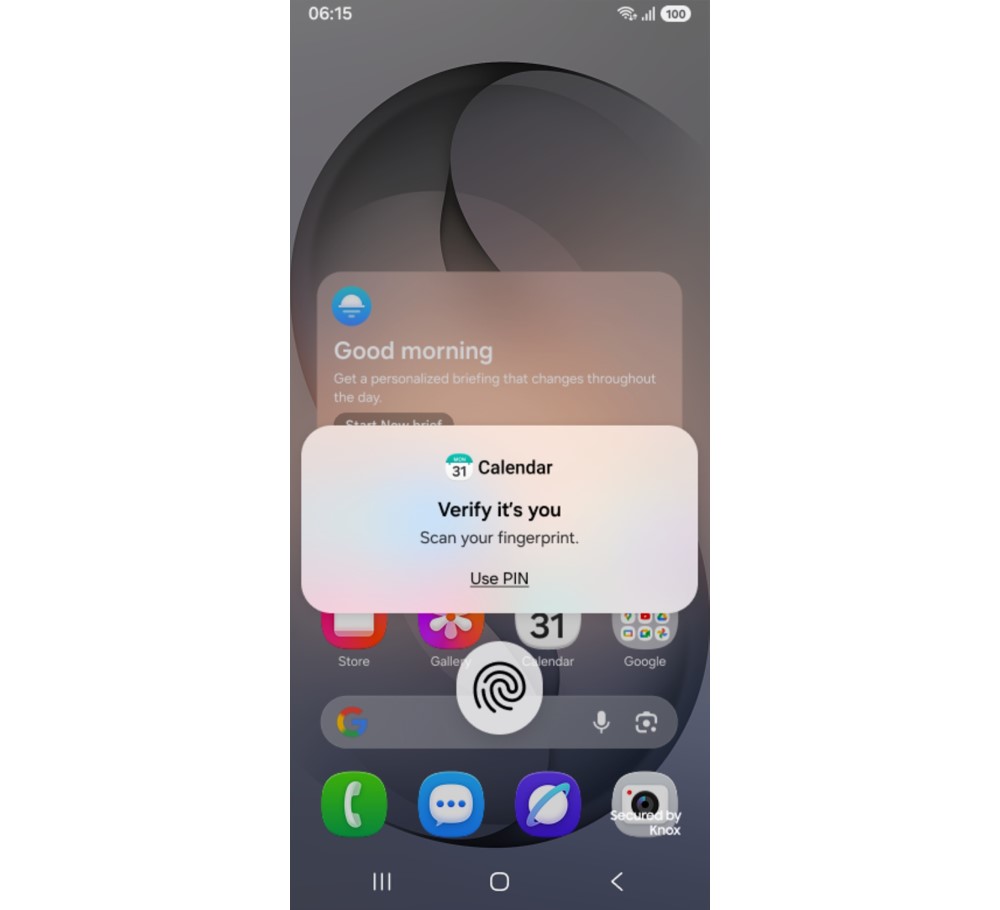
The biggest change is App Lock. Until now, Galaxy users who wanted to lock a single app had to move it into Secure Folder or use a third-party app. One UI 9.5 adds a built-in App Lock: you can lock any individual app behind your fingerprint or your screen lock (PIN, pattern or password).
While an app is locked, its notification content and its widgets stay hidden, so nobody can read your messages or see your photos from the lock screen or home screen even if they are holding your unlocked phone. Google added a similar feature in Android 17 QPR2 for Pixel phones, and Samsung users are finally getting their own version.
Camera: better Pro modes and simpler controls
For people who shoot photos and videos, One UI 9.5 brings two camera upgrades. First, the default camera gets improved controls and a zoom bar, with the key settings laid out on one screen so you do not have to dig through menus while shooting.
Second, the Pro and Pro Video modes get customizable controls and presets: you can create custom buttons, see lens and zoom levels as focal lengths, fine-tune manual sliders, and watch an improved histogram and audio meter while recording. Samsung notes these enhanced Pro modes are only on models that support them; Pro Lite and Pro Video Lite models are excluded.
Samsung Health: Mindful Note and Medications
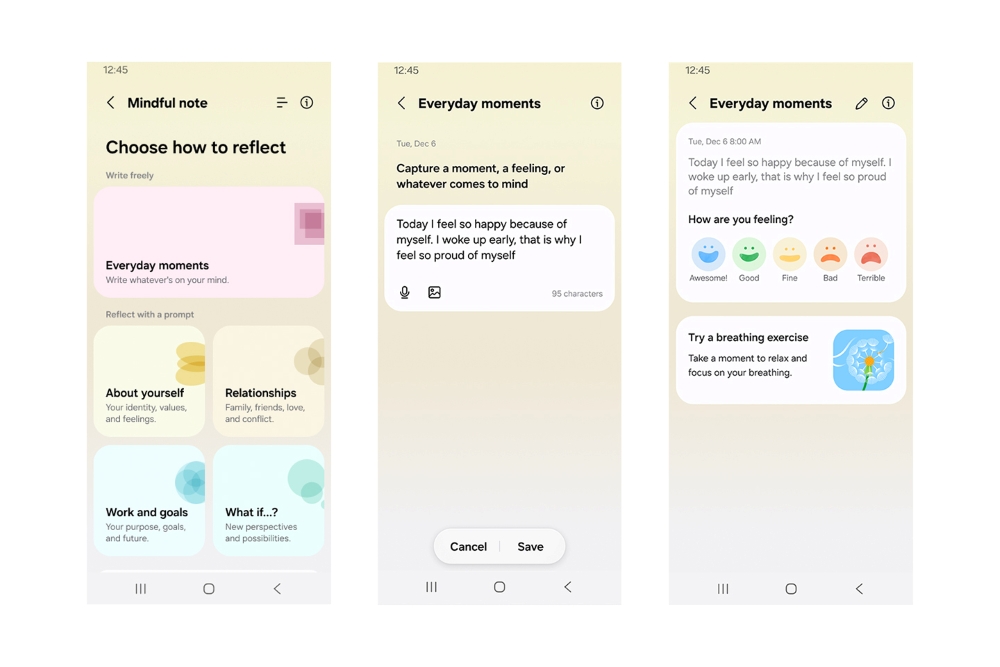
Samsung Health gains two new tools. Mindful Note is a journaling feature that lets you write freely or follow guided prompts to reflect on your thoughts and feelings — Samsung shows it with everyday-moment entries and mood check-ins.
Medications lets you add prescriptions, vitamins and supplements, set personal reminders, and track whether you took each dose. Samsung adds that availability may vary by market and that the feature gives no medical advice; health decisions should still come from a doctor.
Accessibility and everyday extras
One UI 9.5 adds a dedicated floating shortcut that keeps frequently used controls within reach, and improved hearing aid controls in the notification panel: you can change the volume directly and choose which sounds — notifications, ringtones or alarms — are sent to your hearing aids.
The full changelog lists more small improvements: a live depth effect for lock screen wallpapers that shifts elements as you tilt the phone, a lock screen clock you can customize further, a “Pause before app launch” option that adds a 10-second pause before a chosen app opens, a Privacy Display that can switch on automatically for secure features such as locked apps and private albums (on the Galaxy S26 Ultra), fingerprint and face recognition working at the same time, PPTX and DOCX files opening directly in My Files, better window maximizing in Samsung DeX, and sports animations in the Now bar.
How to join the One UI 9.5 beta in India
- Open the Samsung Members app on your Galaxy S26, S26+ or S26 Ultra and sign in with your Samsung account.
- Find the One UI 9.5 Beta banner in the Beta Program section and tap Join.
- Go to Settings > Software update > Download and install.
- The download is about 3.5–3.7 GB, so use Wi-Fi and keep the phone charged. Early reports say a second update of about 540 MB arrives after the first restart. Beta places are usually limited, so if you do not see the banner, check again later — Samsung rolls enrolment out in waves.
The catch: this is beta software
Before you tap Join, understand the risks. Beta software can have bugs, drain battery faster, or break apps that worked fine before. Samsung itself warns that beta updates can behave unexpectedly, so back up your phone first — Smart Switch on a PC is the safest way.
And if you decide to leave the beta, going back to the stable version normally means a factory reset, which erases everything on the phone. If the Galaxy S26 is your only phone and you depend on it every day, the safer choice is to wait for the stable release early next year.
What this means for other Galaxy phones
For now, One UI 9.5 beta is a Galaxy S26-only test. Owners of the Galaxy S25 series, foldables and A-series phones will have to wait — Samsung has not announced which phones join next or when.
The November 2026 security patch continues to roll out separately to older flagships, as Unfite reported for the Galaxy S25 and S24 series and for the Galaxy Z Fold 7 and Flip 7 in India. The beta is the first look at what Samsung’s next software version will feel like, and the App Lock alone makes it the most useful One UI update in a while.
Read Samsung’s official announcement for the full details from the company.
The good and the not-so-good
Good:
- A native App Lock at last.
- Genuinely useful camera controls.
- Mindful Note and Medications add real value to Samsung Health.
- India is in the first wave on day one.
Not so good:
- Only three phones can join.
- Beta bugs are a real risk.
- Leaving the beta wipes the phone.
- There is still no date for the stable release or for other Galaxy models.
FAQ
Is the One UI 9.5 beta available in India?
Yes. The One UI 9.5 beta India rollout includes India as one of six first-wave countries, along with Germany, South Korea, Poland, the UK and the US. It is open to Galaxy S26, S26+ and S26 Ultra users through the Samsung Members app.
Which phones can install the One UI 9.5 beta?
Only the Galaxy S26, Galaxy S26+ and Galaxy S26 Ultra for now. The Galaxy S26 FE, Galaxy Z Fold 8, Flip 8 and older phones are not included yet.
How big is the One UI 9.5 beta download?
About 3.5–3.7 GB for the first update, with early reports of a second update of about 540 MB after the phone restarts. Use Wi-Fi and charge the phone first.
Is One UI 9.5 based on Android 17 or Android 18?
It is based on Android 17, the same base as One UI 9. It is a feature update, not a new Android version.
When will the stable One UI 9.5 update release?
Samsung has not announced a date. Reports expect it to debut on the Galaxy S27 series in early 2027 and then reach the S26 series and other phones in the following weeks.
The One UI 9.5 beta is a strong early look at Samsung’s next software step, and Indian Galaxy S26 owners do not have to wait for it. App Lock is the feature most people will notice first, but the camera, health and accessibility changes add up to a genuinely useful update. Just remember it is beta software: back up first, and if your phone is your daily driver, waiting for the stable release is the sensible call. Unfite will keep tracking the beta and the stable rollout as Samsung shares more.