Good news for OPPO Reno 14 5G owners in India. The stable ColorOS 17 update, based on Android 17, is now rolling out, and the wider over-the-air (OTA) rollout starts today, 24 November 2026. Unfite has checked the official rollout schedule, the build details and the early user reports, so you can see exactly what is changing and how to get the update on your phone.
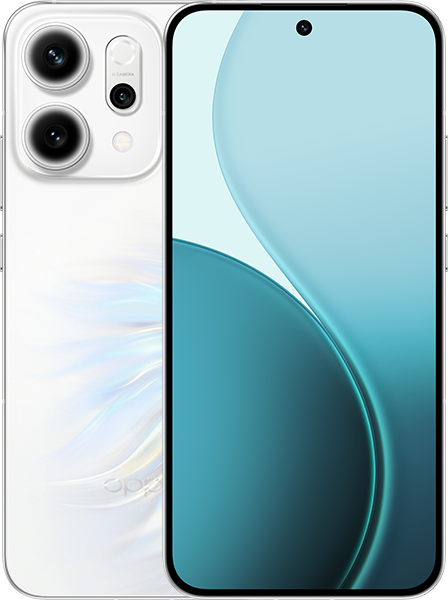
If you own the standard Reno 14 5G, this is the update you have been waiting for. It is not a small security patch. It moves the phone to a new Android version, brings a fresh ColorOS design, and adds new AI tools. The download is large, so it is worth preparing your phone before you tap install. Unfite has put the key details in a short table below, so you can check the build number in seconds.
OPPO Reno 14 5G ColorOS 17 update at a glance
| Phone | OPPO Reno 14 5G (India model CPH2737) |
| New version | Stable ColorOS 17, based on Android 17 |
| New build number | CPH2737_17.0.0.100 |
| Previous build | CPH2737_16.0.10.601 (ColorOS 16) |
| Download size | About 3.06 GB |
| Android before | Android 16 (with ColorOS 16) |
| Android after | Android 17 (with ColorOS 17) |
| Wider rollout starts | 24 November 2026, in India |
| How it arrives | Free OTA update, in phases |
The build number is the easiest way to check whether you have the new version. After the update, your phone should show CPH2737_17.0.0.100. If it still shows a ColorOS 16 build, the rollout has not reached your unit yet.
How the rollout is happening in India
OPPO’s official rollout schedule lists the Reno 14 5G for 24 November 2026, together with the Reno 14 Pro 5G, Reno 14 F 5G, Find N3, Find N3 Flip and OnePlus Open. The OPPO India ColorOS 17 page also lists the Reno 14 5G in the November batch. That is why today matters: it is the start of the wider OTA rollout, not just a test for a small group.
The update did not appear out of nowhere. India users posted screen recordings of the actual Software Update screen on 18-19 November 2026 showing this build, CPH2737_17.0.0.100. There were three independent posts: two Instagram reels and one Facebook post. A YouTube video also shows a Reno 14 5G running ColorOS 17 after three days of use. Taken together, those early reports match the official schedule and give a clear picture of what is rolling out.
Some early users received the update through the Release Candidate route. That path is Settings > Software update > the menu in the top corner > Beta program > Release Candidate. If you are reading this on or after 24 November, you should not need that route. The normal Software Update check should now offer the stable build when your turn comes.
It is important to be patient here. The rollout is phased, so not every unit gets it on the same day. OPPO sends large Android updates in batches to keep its servers steady and to catch any early problem before it reaches every phone. If your friend’s Reno 14 5G already shows the update and yours does not, that does not mean your phone has a fault. It usually means your batch is still to come.
That is also why this post is separate from our earlier story on the Pro model. The Reno 14 Pro 5G received its own ColorOS 17 build, and you can read that story here: OPPO Reno 14 Pro ColorOS 17 update in India. The standard Reno 14 5G is a different phone, with a different model number and a different build, so it has its own rollout and its own checks.
What is new in ColorOS 17
ColorOS 17 is built on Android 17, and OPPO describes it with the line “Silky Smooth. Flow with AI.” The focus is on a fresh, fluid design that feels quicker and more personal, rather than a single headline feature.
Two engines sit behind that promise. The Luminous Rendering Engine works on how the screen draws and animates, while the Laminar Flow Engine works on how the phone moves between apps and screens. In plain terms, OPPO wants scrolling, opening apps and switching tasks to feel smoother, with fewer stutters.
The update also brings more personalised OPPO AI features, new lock-screen and always-on display customisation, and refreshed stock apps. On the AI side, OPPO lists summaries, writing help and photo tools, although availability varies by device and region. That last point matters: not every AI feature shown in OPPO’s global material will appear on every phone in India, so it is best to check what actually appears in your settings and apps after the update.
You can see OPPO’s own overview on the official page: OPPO ColorOS 17. It is the best place to check the design and feature list in OPPO’s own words.
For most owners, the change you will notice first is the look and feel. Icons, animations, the lock screen and the quick settings area should feel fresher. The deeper changes, such as the Android 17 base, will show over time in app support, privacy controls and day-to-day speed.
A note on the build number
Build numbers can vary by variant, so do not be confused if you see a slightly different number in a video or a screenshot from another country. One recording showed a different variant build, CPH2757_17.0.0.100. The standard India Reno 14 5G, model CPH2737, is CPH2737_17.0.0.100. That is the number to look for in India.
We are not claiming a specific security-patch date for this phone. The documented screens show the version and the download size only. As clearly-labelled context, the sibling Reno 14 Pro’s build, CPH2739_17.0.0.101, moved its patch from 1 October 2026 to 1 November 2026. That tells us about the Pro model, not about this phone, so treat it as background only.
OPPO Reno 14 5G quick recap
The Reno 14 5G launched in India on 3 July 2025, and its first sale was on 8 July 2025 through Flipkart, Amazon, the OPPO India site and offline stores. It shipped with Android 15 and ColorOS 15, so ColorOS 17 is its second big software step in India. The phone was known at launch for its slim design, its periscope zoom camera and its large 6,000mAh battery.
It has a 6.59-inch AMOLED display with a 120Hz refresh rate, a MediaTek Dimensity 8350 chip, and up to 12GB of RAM and 512GB of storage. The camera setup is led by a 50MP main camera with optical image stabilisation, joined by a 50MP periscope telephoto camera with 3.5x optical zoom and an 8MP ultra-wide camera. The front camera is a 50MP autofocus unit, and the phone can record 4K video.
Other highlights include 80W SUPERVOOC fast charging, an aluminium frame, and IP66, IP68 and IP69 ratings for dust and water resistance. At 7.4mm thick and 187g, it is also easy to hold for a phone with such a large battery. It comes in Luminous Green, Mint Green and Opal White.
OPPO Reno 14 5G full specifications
| Display | 6.59-inch AMOLED, 1256 x 2760, 120Hz, up to 1,200 nits, Corning Gorilla Glass 7i |
| Processor | MediaTek Dimensity 8350 (4nm, up to 3.35GHz) |
| RAM | Up to 12GB LPDDR5X |
| Storage | Up to 512GB UFS 3.1 |
| Rear cameras | 50MP main (OIS) + 50MP periscope telephoto (OIS, 3.5x optical zoom) + 8MP ultra-wide |
| Front camera | 50MP autofocus, 4K video |
| Battery | 6,000mAh typical (5,840mAh rated), 80W SUPERVOOC, no wireless charging |
| Build | Aluminium frame, IP66 + IP68 + IP69, 7.4mm, 187g |
| Colours | Luminous Green, Mint Green, Opal White |
| Software at launch | Android 15 with ColorOS 15 |
| Software now | Android 17 with ColorOS 17 (CPH2737_17.0.0.100) |
Price and availability
At launch in India, the Reno 14 5G was priced at Rs 37,999 for 8GB RAM and 256GB storage, Rs 39,999 for 12GB RAM and 256GB storage, and Rs 42,999 for 12GB RAM and 512GB storage. Those are launch prices only. Prices have moved since launch, with offers, discounts and stock changing from store to store, so check the current price on Flipkart, Amazon or the OPPO India site before you buy.
The ColorOS 17 update itself is free. It is delivered over the air to existing Reno 14 5G owners in India, so you do not need to pay for it or visit a service centre to get it.
How to install the ColorOS 17 update
Before you start, back up your important data, connect to Wi-Fi, and make sure your battery is above 50%. The download is about 3.06 GB, so a stable Wi-Fi connection will save both time and mobile data. Then follow these steps on your Reno 14 5G.
- Back up your photos, chats and files.
- Connect to Wi-Fi and charge your phone above 50%.
- Open Settings, then tap About device and tap the software version banner, or go to Settings > System & update > Software update.
- Tap Check for updates and wait for the phone to look for the new version.
- If CPH2737_17.0.0.100 appears, tap Download and Install.
- Let the phone finish the update and restart. The first boot after a major update can take a few minutes, so do not switch the phone off during this time.
- After it restarts, check Settings > About device to confirm the build number.
If the update does not appear yet, the phased rollout has not reached your unit. Check again in a day or two. Do not sideload firmware from unknown sources, because a wrong or tampered file can damage your phone or put your data at risk. The official OTA route is the safe way to get ColorOS 17.
What to keep in mind
A major Android update changes a lot under the surface, so a few small things are normal. Your phone may feel warm or use a little more battery for the first day while it finishes setting up apps in the background. Some apps may also need an update from the Play Store to work their best with Android 17.
Give the phone a day or two to settle before you judge battery life or speed. If an app keeps crashing after that, update it, clear its cache, or reinstall it. If a problem is wider than one app, check for a follow-up update in Software Update, because OPPO often follows a major release with small fixes.
Finally, remember that AI features can vary by device and region. If a feature you saw in a video does not appear on your phone, it may not be part of this India build, or it may arrive later. Check the settings and apps on your own phone rather than relying on a screenshot from another country.
Frequently asked questions
Is the OPPO Reno 14 5G ColorOS 17 update rolling out in India?
Yes. The stable ColorOS 17 update for the India Reno 14 5G (CPH2737) starts its wider OTA rollout on 24 November 2026. It arrives in phases, so some phones will see it before others.
What is the build number and download size of the update?
The India build is CPH2737_17.0.0.100, and the download is about 3.06 GB. It replaces the ColorOS 16 build CPH2737_16.0.10.601 and moves the phone to Android 17.
How do I install ColorOS 17 on my Reno 14 5G?
Back up your data, connect to Wi-Fi and charge above 50%. Then go to Settings > About device > software version banner > Software update, or Settings > System & update > Software update, tap Check for updates, and tap Download and Install when the new build appears.
What if the update does not show on my phone yet?
Wait and check again in a day or two. The rollout is phased, so your unit may not be in the first batch. Do not sideload firmware from unknown sources.
Is the ColorOS 17 update free?
Yes. It is a free OTA update for Reno 14 5G owners in India. You do not need to pay for it.
Image Credit: OPPO — Official product image
The Reno 14 5G was already a strong mid-range phone, and ColorOS 17 gives it a fresh start with Android 17. If the update has reached your phone, install it over Wi-Fi, give it time to settle, and enjoy the smoother design and new AI tools. At Unfite, we will keep tracking this rollout and any follow-up fixes, so check back if your phone has not received it yet.