Unfite brings you the latest update news for OPPO users in India. The OPPO Reno 14 Pro ColorOS 17 update has started rolling out in India, moving the phone from ColorOS 16 based on Android 16 to ColorOS 17 based on Android 17. The update was documented on an India unit on 18 November 2026, a few days ahead of the 24 November date on OPPO’s official rollout schedule, and it brings a fresh design, smarter performance and a set of new AI tools along with the November 2026 security patch.
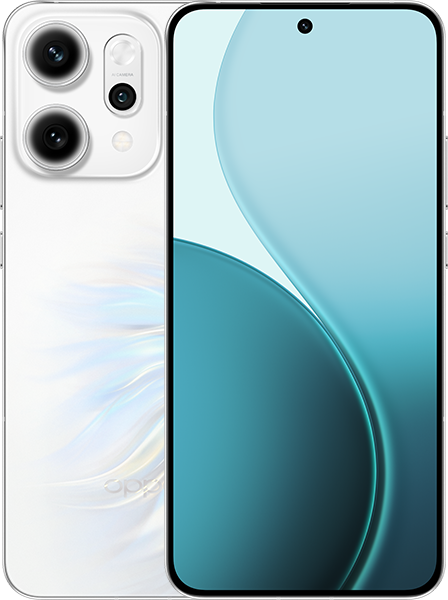
OPPO Reno 14 Pro ColorOS 17 update: what arrived
The update arrived on an India Reno 14 Pro 5G (model CPH2739) as build CPH2739_17.0.0.101, with a download size of 3.22 GB. It replaces the previous build CPH2739_16.0.10.600. The Android security patch moves from 1 October 2026 to 1 November 2026.
Build before: CPH2739_16.0.10.600. Build after: CPH2739_17.0.0.101. ColorOS version before: 16.0.10. After: 17.0. Android version before: Android 16. After: Android 17. Security patch before: 1 October 2026. After: 1 November 2026. Update size: 3.22 GB.
OPPO’s official schedule had listed the Reno 14 Pro 5G for 24 November 2026, together with the Reno 14 5G, Reno 14 F 5G, Find N3 and Find N3 Flip. OPPO has been releasing updates a few days ahead of these dates in this rollout, so the early arrival on 18 November fits the pattern. The rollout is phased, so the update may not reach every Reno 14 Pro in India on the same day. If it has not appeared on your phone yet, keep checking the software update screen over the next few days.
The Reno 14 Pro is not the first Reno phone to get the new software in India. The Reno 15 5G received its stable ColorOS 17 update earlier in November, and Unfite covered that rollout in detail. The Reno 14 Pro now joins it, and the rest of the Reno 14 family is due to follow on the same schedule.
What changes on your phone
The most visible change is the new look. ColorOS 17 replaces the compact lock screen clock with a tall, translucent clock that fills the top half of the screen and sits over the wallpaper. The clock font now resizes based on how much notification content is on screen, and lock screen notifications collapse downward and stack. The home screen gets a new default wallpaper, a purple and orange design built from overlapping lens shapes, while app icons and the layout carry over as they were.
Quick Settings gets rounder pill-shaped tiles for Wi-Fi and Bluetooth, and the brightness and volume sliders now look like frosted glass with fully rounded ends. The notification drawer keeps its layout, but the cards are lighter and more see-through, which OPPO says improves contrast and readability. Several system apps — Clock, Files and Photos — move their bottom tab bars into a floating, rounded “island” that sits above the content. The home screen style editor renames its Style button to Effects, and the wallpaper picker gets a new icon and a fresh ColorOS 17 wallpaper set. The About device page swaps the old version card for a large ColorOS 17.0 banner marked “Version up to date”.
Some things stay the same. The power menu looks unchanged, and holding the power button alone still opens Gemini. The fluid clock effect now carries the clock across the Always-On Display, the lock screen and the home screen, so unlocking the phone feels like one continuous motion.
Performance: Laminar Flow Engine and Luminous Rendering Engine
Under the surface, ColorOS 17 brings the next-generation Luminous Rendering Engine, which renders light effects and the interface together for smoother animations. The Laminar Flow Engine gets smarter memory scheduling, which OPPO says keeps the phone stable and smooth even when memory is under heavy load, and reduces unnecessary background app closures. The engine now uses on-device personalised modelling to understand which apps you actually want running in the background.
In simple terms, the phone should feel smoother when you switch between apps, scroll through feeds and open the camera. The update also adds rotation animations for apps running in landscape mode, so switching between portrait and landscape feels more natural, and it refreshes Live Alerts with light, translucent visuals inspired by clouds.
New AI features in the OPPO Reno 14 Pro ColorOS 17 update
The update adds several AI tools. Mind Space lets you save TXT, PDF and Word documents from the Documents app and generate summaries for easier reading, and it adds a Travel collection that automatically organises your trip locations into a personalised travel map. AI Suggest now shows train and flight trip notifications, and Live Alerts can show ride-hailing status for Uber and Ola. A new AI Highlights feature automatically organises key information like weather, calendar events and trending news.
OSee is OPPO’s new AI vision tool. Take a photo and it understands your intent and recommends relevant features. It also brings ultra-clear document scanning with one tap, with an AI Hyper Clarity algorithm that sharpens text, edges and image quality, plus layout-aware document extraction that preserves headings, paragraphs and tables, and export to PDF. The new Translate app puts photo, voice and text translation at the bottom of the screen, with more languages supported by AI models.
For safety, the update adds AI Face Swap Detection, which looks for signs of AI face swapping in video calls in real time and alerts you, and it improves AI Scam Call Detection so it can spot AI-generated voices during calls. Photos can now view and share images and videos from certain third-party devices without importing them first, and the O+ Connect ecosystem adds third-party camera support with one-time pairing.
OPPO Reno 14 Pro 5G: quick recap and specifications
The Reno 14 Pro 5G launched in India on 3 July 2025, with sales starting on 8 July 2025. It launched at Rs 49,999 for the 12GB + 256GB model and Rs 54,999 for the 12GB + 512GB model. Some retailers now list the base model lower, from around Rs 47,999. The phone shipped with ColorOS 15 based on Android 15, so ColorOS 17 is its second major Android upgrade.
Display: 6.83-inch 1.5K AMOLED, 120Hz, 1272 x 2800. Processor: MediaTek Dimensity 8450. RAM and storage: 12GB RAM, 256GB / 512GB. Rear cameras: 50MP main (OIS) + 50MP telephoto 3.5x (OIS) + 50MP ultra-wide (AF). Front camera: 50MP. Battery: 6,200mAh, 80W SUPERVOOC wired, 50W wireless. Durability: IP66 / IP68 / IP69, metal frame. Software: ColorOS 17, Android 17 (after this update). Model: CPH2739.
The triple 50MP camera system is the phone’s headline feature, with a 3.5x telephoto lens for portraits and a 50MP ultra-wide camera with autofocus. The 6,200mAh battery with 80W wired charging and 50W wireless charging is rare at this price, and the IP66, IP68 and IP69 ratings mean the phone is protected against dust, immersion and high-pressure water jets.
How to install the update
- Connect your phone to Wi-Fi and make sure the battery is above 50 percent, or keep the phone on charge.
- Back up your important photos and files first. The upgrade should not delete your data, but a backup is always the safe choice.
- Open Settings, then go to System & update, and tap Software update.
- If build CPH2739_17.0.0.101 is available, tap Download and then Install.
- The download is 3.22 GB, so it will take some time on a slower connection. Do not switch off the phone during the installation.
- After the update, the phone will optimise itself in the background. It may feel a little warm, slow or use more battery than usual for a day or two. This is normal and settles on its own.
If the update is not showing yet, your phone is simply in a later batch of the phased rollout. Check again in a day or two. Do not install update files from unknown websites, and do not use third-party tools to force the update, as that can damage the phone or void support.
Pros and cons of the update
Pros: a fresh, more fluid design across the lock screen, Quick Settings and system apps; Android 17 with the November 2026 security patch; useful AI tools for documents, translation and travel; better background app management; stronger scam-call and face-swap protection.
Cons: the 3.22 GB download is large and needs good Wi-Fi; the rollout is phased, so some users will wait days; a few AI features may vary by device or region; the phone may run warm for a day or two while it optimises after the upgrade.
Frequently asked questions
- When did the OPPO Reno 14 Pro ColorOS 17 update arrive in India? The update was documented on an India Reno 14 Pro 5G on 18 November 2026, with build CPH2739_17.0.0.101. OPPO’s official schedule had listed the phone for 24 November, but the rollout started a few days early.
- What is the build number of the ColorOS 17 update for the Reno 14 Pro? The stable build is CPH2739_17.0.0.101, sized 3.22 GB. It replaces build CPH2739_16.0.10.600 and moves the phone to Android 17 with the 1 November 2026 security patch.
- How do I check for the ColorOS 17 update on my Reno 14 Pro? Go to Settings, then System & update, then Software update, and tap Check for updates. The rollout is phased, so it may take a few days to reach your phone.
- Is the ColorOS 17 update free for the Reno 14 Pro? Yes. The update is free. You only need Wi-Fi for the 3.22 GB download and enough free storage space on the phone.
- Will the update delete my photos or apps? No, upgrading the system should not delete or change your data. OPPO still recommends making a backup before you start, just to be safe.
Final words
The OPPO Reno 14 Pro ColorOS 17 update is a solid upgrade for a phone that is already one of OPPO’s best camera phones in its price range. The new design is the first thing you will notice, the November 2026 security patch keeps the phone protected, and the AI tools for documents, translation and travel are genuinely useful for daily life. If the update has reached your phone, install it over Wi-Fi with a backup done first. If it has not arrived yet, wait for your batch — the phased rollout should reach all India units soon.
Image Credit: OPPO — Official product image
1 thought on “OPPO Reno 14 Pro 5G Gets ColorOS 17 Update in India: Android 17, Build, New Features”