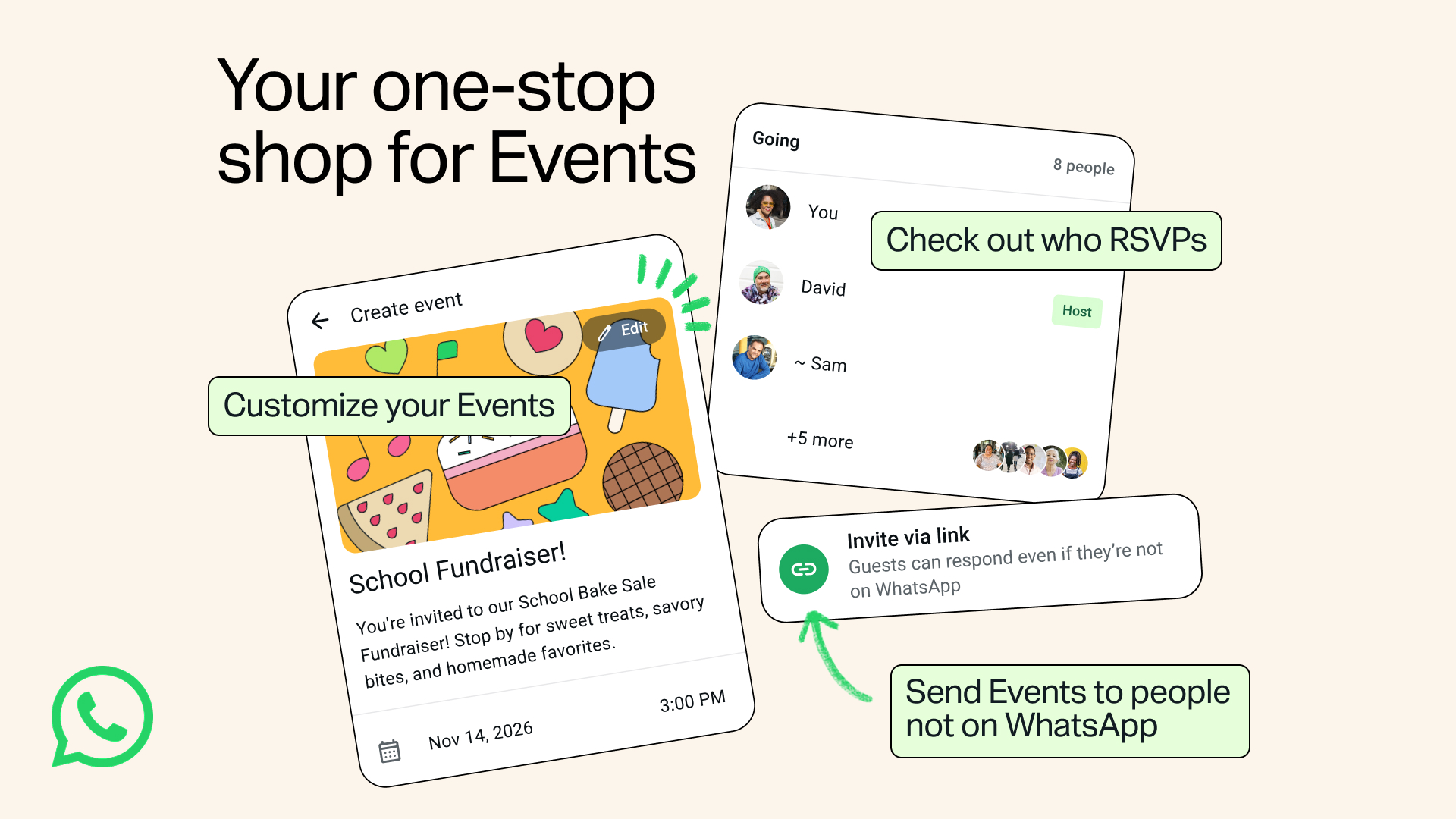
WhatsApp has just made planning a party, a family function or an office get-together much simpler. Unfite brings you the full details of the new WhatsApp Events Home and the biggest change inside it: you can now invite people who do not even have WhatsApp, and they can still see the details and reply to your invite.
Related: WhatsApp Smart Text Actions
Meta announced the update on 5 November 2026, and the rollout has already started. The new Events experience will reach everyone over the coming weeks, so it may not be on your phone today, but it is on its way. There is no extra charge for it. It is part of WhatsApp itself.
WhatsApp Events Home: invite anyone, even without the app
Until now, a WhatsApp event could only reach people who were already in the chat. If one cousin, colleague or neighbour did not use WhatsApp, you had to message them separately on another app and keep track of their reply on your own.
That changes with this update. You create an event, add a cover photo, and share the invite link. The person on the other end can open the link in a browser, read the event details and send their RSVP without downloading WhatsApp or creating an account. The invite can be shared by text message or email, or shown as a QR code, according to 9to5Mac.
Guests who do not have WhatsApp can reply with one of three options: Going, Maybe or Not going. They enter their name and mobile number to confirm, as reported by Digit. That is all they need to do. They never have to install the app.
What is Events Home?
Alongside the open invites, WhatsApp is adding a dedicated WhatsApp Events Home. It is a single place to build invitations, send them and track who is coming. You can find it by opening Settings and then tapping Events.
WhatsApp Events Home lists your past and upcoming events in one place. That includes the events you created and the ones you were invited to. Instead of hunting through different chats to find who said yes, you can see the full list and every RSVP together.
Hosts get a few extra tools inside WhatsApp Events Home. You can customise the invite, send custom reminders to your guests, and let a guest bring a plus-one. The idea is simple: one screen for the whole job, from the first invite to the final headcount.
Privacy is built into the new invites
WhatsApp says it built the new event invites with privacy in mind. Two rules matter most.
First, your phone number will not be shown to event guests you do not know. Second, guests who do not have a WhatsApp account will only see the event address after they submit their RSVP. So a stranger who gets your link by mistake cannot see where the event is happening, and cannot see your number either.
There is one more small limit worth knowing. Call links cannot be added to events that are scheduled more than 12 months in advance.
How to use WhatsApp Events Home
Once the update reaches your phone, here is how it works:
- Open a one-to-one chat or a group chat and create an event, just like before.
- Add the event name, date, time and location, and pick a cover photo to make the invite look nice.
- Share the invite link with anyone, on WhatsApp or outside it, by text, email or QR code.
- Guests open the link, read the details and RSVP as Going, Maybe or Not going.
- Open Settings, then Events, to see Events Home, where you can track every RSVP, send reminders and manage the guest list.
If you do not see WhatsApp Events Home yet, check that WhatsApp is updated to the latest version from the Google Play Store or the App Store. The rollout is happening in stages, so some phones will get it before others.
A quick look back: how Events got here
Events on WhatsApp is not brand new. It first arrived in May 2024 for groups inside Communities, then rolled out to all group chats in August 2024, and later reached one-to-one chats in April 2025. Until this update, though, every guest had to be on WhatsApp. The November 2026 update removes that last barrier and adds the WhatsApp Events Home hub on top.
Why this matters for users in India
In India, WhatsApp is the default way families and housing societies plan things. A birthday, a wedding function, a society meeting or a school fundraiser usually starts in a WhatsApp group. But there is almost always someone in the family who does not use the app, or a guest who uses a different messaging service. Earlier, that person was left out of the planning or had to be chased separately.
With shareable invite links, that problem goes away. One link covers everyone, and the host still gets a clean RSVP list in WhatsApp Events Home. For office teams and community groups, the custom reminders and plus-one option make the headcount easier too.
What is still missing
The update is a rollout, not a switch that turns on for everyone at once. WhatsApp has not given a single date by which every user will have it. The company only says the updated Events experience is rolling out to everyone over the following weeks. Availability may also differ by region and by account during that time.
Also, this is an invitation and planning update, not a new chat feature. It does not change how messages, calls or groups work. If you were hoping for a new chat tool, this is not it. It is a planning tool, and a useful one.
Frequently asked questions
- What is WhatsApp Events Home?
WhatsApp Events Home is a new dedicated section in WhatsApp where you can create event invitations, send them, track RSVPs and manage your events in one place. You can find it by going to Settings and then Events. - Can I invite someone who does not have WhatsApp to an event?
Yes. You create the event, add a cover photo and share the invite link. People without WhatsApp can open the link in a browser, see the details and RSVP without downloading the app or creating an account. - How do guests without WhatsApp RSVP?
They open the invite link, enter their name and mobile number, and choose Going, Maybe or Not going. - Will strangers see my phone number or the event address?
No. WhatsApp says your phone number is not shown to guests you do not know, and guests without a WhatsApp account only see the event address after they RSVP. - When will I get WhatsApp Events Home on my phone?
The update is rolling out now and will reach everyone over the following weeks. Update WhatsApp to the latest version and check Settings, then Events. If it is not there yet, it should arrive soon.
The bottom line
WhatsApp Events Home is a small update with a big practical effect. Invites can now reach everyone, not just people on WhatsApp, and the host gets one tidy place to manage the whole event. If you plan family functions, society events or team outings on WhatsApp, this is one update worth watching for. Unfite will keep an eye on the rollout and report back when the feature reaches more users in India.
Image Credit: WhatsApp — Official Events announcement image via Meta Newsroom